
Plain-English reporting
Turning GA4 into a report a coach with zero marketing background can actually use.
- My role
- Analytics and reporting
- Built in
- Google Analytics 4, Looker Studio, Notion
The problem
Susan Hughes runs a coaching business for parents of kids with ADHD. She had GA4 running, but no idea what any of it meant, which is true for most people who open it.
She didn't need more charts. She needed someone to tell her what happened this month and what to do about it.
What I built
Cut the report down to what she can act on
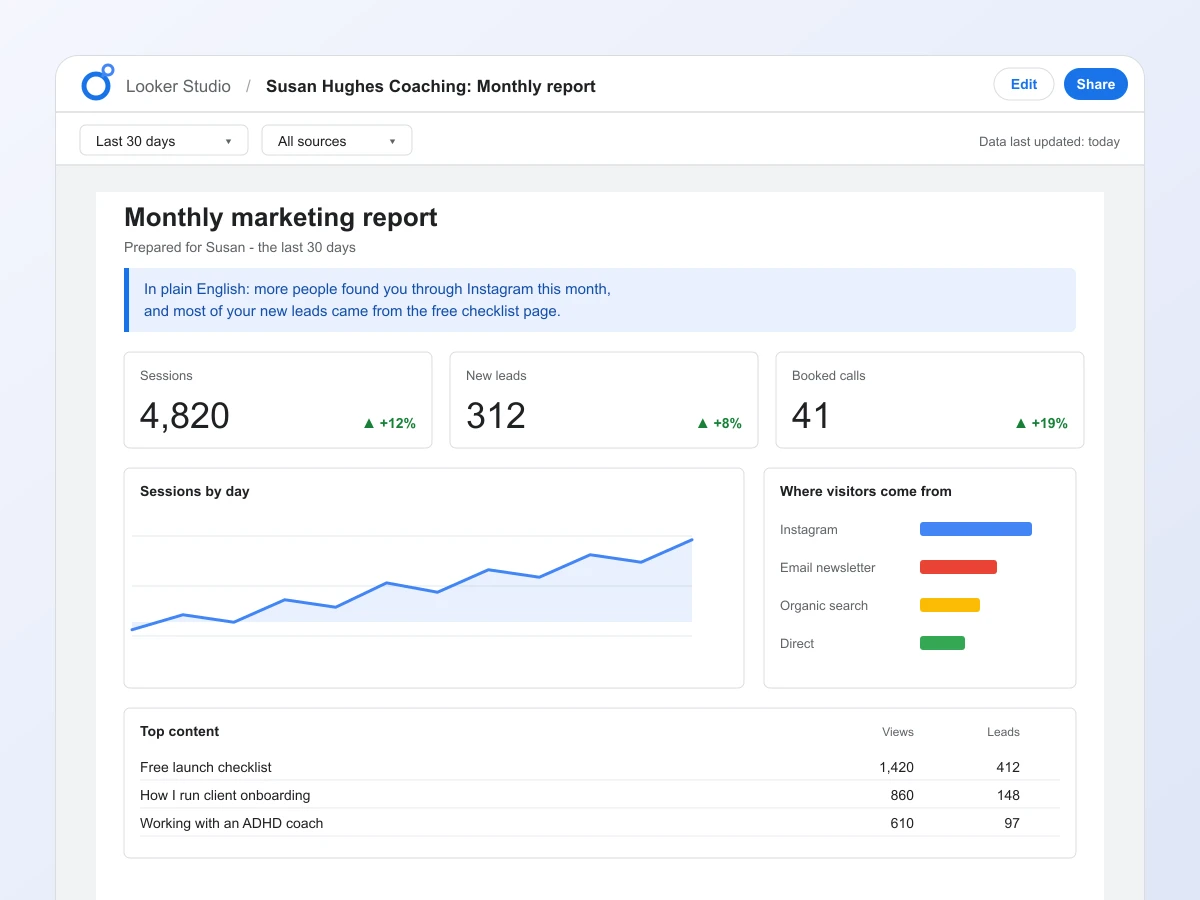
Each month starts with three sentences in plain English: what happened, where the traffic came from, and which content did well. Then one thing to actually do about it.
Build the dashboard in Looker Studio
The numbers behind those sentences live in a Looker Studio dashboard, set up to show only the few measures she cares about. No event names, no jargon.
Attach a Notion summary
The written summary sits in Notion next to the dashboard, so the story and the numbers are in one place and she never has to open GA4 herself.
What changed
Susan reviews her own numbers every month now, without a call. She makes content decisions from what's actually working instead of a gut feeling.
She reviews her own numbers every month now, no call needed, and makes content decisions based on what's actually working instead of a gut feeling.
- Google Analytics 4
- Looker Studio
- Notion
Work with me
Tell me what you are selling and where things feel stuck, and we will talk through honest next steps. Book a call if you would rather talk it through, or send a message and I will get back to you within a couple of hours.
You won't find my email floating around this page, which keeps the spam bots away. This form goes straight to my inbox though.
Or send me a message